Excelco Brush Font Review
As a web designer, I often find myself searching for the perfect typeface to bring a website’s visual identity to life. Recently, I had the chance to test the Excelco Brush font in a few real-world design scenarios, and it quickly became a standout choice for its unique character and versatility.
First Impressions: A Bold and Creative Display Font
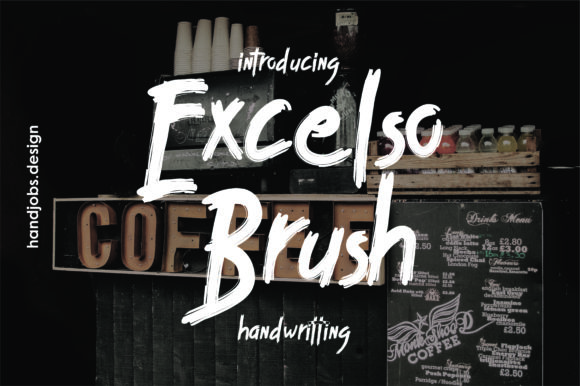
When I first opened the Excelco Brush font files, I was struck by its bold, expressive style. The font feels like a brushstroke captured in digital form—each letter has a natural flow and a touch of handmade charm. It’s not just a font; it’s a visual statement that can elevate any design with its artistic flair.
What makes Excelco Brush particularly appealing is its inspiration from coffee and brush strokes. This gives it a warm, organic feel that works well for brands looking to convey creativity, craftsmanship, or a cozy, artisanal vibe. Whether you're designing a boutique online store or a creative portfolio, this font adds a sense of personality and authenticity.
Testing in Real Web Projects
I started by testing Excelco Brush in a hero section of a new product landing page. The font worked beautifully as a headline, drawing attention with its dynamic shape and expressive curves. It stood out against a simple background, making the message more engaging and memorable.
Next, I used it for a call-to-action button on a coaching website. The font’s boldness made the button pop, while its fluidity kept the design from feeling too rigid. It added a human touch that resonated well with the brand’s approachable and supportive tone.
On mobile devices, Excelco Brush held up surprisingly well. Even at smaller sizes, the font remained legible, though I found that it works best for short phrases rather than long blocks of text. For body copy, I paired it with a clean sans serif font to maintain readability without sacrificing visual interest.
Best Uses for Excelco Brush
Excelco Brush shines in areas where visual impact matters most. It’s ideal for headlines, section titles, buttons, and decorative accents. Its expressive nature makes it a great choice for logos, especially for businesses that want to emphasize creativity or a personal touch.
For example, I used it on a blog header for a lifestyle website, and it added a sense of energy and movement that matched the site’s content. It also worked well as a title for a digital course landing page, helping to create a strong first impression.
In a portfolio project, I experimented with using Excelco Brush for a client’s name in the navigation bar. The result was elegant and modern, giving the site a distinctive identity without overwhelming the user experience.
Readability and Responsiveness
One of the key considerations when using a script or display font like Excelco Brush is how it performs on different screen sizes. On desktop, it looks fantastic in large headings, but on mobile, I noticed that the font can become slightly less readable if the text is too small or placed over busy backgrounds.
To optimize readability, I recommend using it for short phrases and ensuring there’s enough contrast between the text and the background. When used on dark backgrounds, the font maintains good visibility, but on light backgrounds, it may require some tweaking to avoid appearing too faint.
For responsive designs, I suggest using a fallback font for smaller screens or when the browser doesn’t support the font. Pairing it with a simple sans serif font helps maintain clarity while keeping the design cohesive.
Font Pairing and Design Flexibility
While Excelco Brush is a standout on its own, it also pairs well with other fonts to create a balanced and professional look. I found that pairing it with a clean, modern sans serif font like Open Sans or Lato created a nice contrast that enhanced both the visual appeal and readability of the design.
For a more editorial feel, I experimented with pairing it with a classic serif font like Georgia or Merriweather. This combination worked well for blog posts or long-form content where a bit of elegance was needed without sacrificing legibility.
When working with clients, I always remind them to check the font’s licensing terms, especially if they plan to use it in commercial projects or sell digital assets. Excelco Brush includes multiple styles and weights, which gives designers more flexibility when creating different elements of a website or brand identity.
Final Thoughts on Excelco Brush
Overall, Excelco Brush is a versatile and expressive font that brings a unique energy to web design. It’s perfect for headlines, buttons, and decorative elements where visual impact is key. While it may not be the best choice for long paragraphs or dense text, it excels in areas that require personality and creativity.
If you’re looking for a font that can help your website stand out while maintaining a professional and polished look, Excelco Brush is definitely worth considering. It’s a great addition to any designer’s toolkit, especially for projects that benefit from a handcrafted or artistic touch.